

SureTriggers vs Zapier: Which Automation Tool Fits WordPress Workflows?
If you are stuck on SureTriggers vs Zapier, decide based on where your triggers start. SureTriggers (OttoKit) is built around WordPress-first events. Zapier is built around app-first connections across hundreds of tools.
Most bad picks happen for two reasons. You underestimate trigger timing and live with late automations. Or you underestimate usage math and your multi-step workflows quietly cost more than you expected.
- Choose SureTriggers (OttoKit) if most triggers happen inside WordPress: WooCommerce, forms, memberships, user roles, content changes.
- Choose Zapier if most triggers start outside WordPress: Google Sheets, Gmail, CRMs, support tools, sales pipelines.
- Pick a hybrid if you want WordPress events to stay local, but still need a few cross-app workflows.
- Avoid SureTriggers if your business lives in non-WordPress tools and WordPress is just a website.
- Avoid Zapier if you need near-real-time actions from WordPress events and delays would cause real problems.
What breaks if you pick wrong: leads, orders, or access changes happen late, or you pay for far more runs than you planned.
Fastest safe default: keep WordPress triggers in SureTriggers (OttoKit) and use Zapier only for the handful of external apps you truly need.
If you only want one section, read the table below, then jump to pricing and timing.
SureTriggers vs Zapier: the decision table that matters
Here you will decide which tool fits your setup without getting distracted by feature lists.
Start with the trigger source. If WordPress is the source of truth, a WordPress-centric layer usually feels simpler. If your apps are the source of truth, a cross-app platform usually wins.
Use the table as a quick pick. Then read the timing and pricing sections to confirm you will not get surprised later.
| SureTriggers (OttoKit) | Zapier | |
|---|---|---|
| Best when your triggers start in | WordPress | Other apps |
| Typical “source of truth” | Site events | App events |
| Timing risk | Depends on trigger type, but often aimed at near-real-time WordPress events | Many triggers are polling triggers unless a webhook exists |
| Cost driver to watch | Plan rules and how many workflows you run | Task-based pricing and multi-step runs |
| Setup location | WordPress plus connected accounts | Zapier workspace plus connected accounts |
| When it feels easiest | WooCommerce, forms, memberships, user roles | CRMs, spreadsheets, sales tools, support tools |
| Most common surprise | Hosting or plugin conflicts can block triggers | Task usage grows fast with filters, paths, and multi-step actions |
| Monitoring you will use | Workflow history and logs | Zap history and task usage |
| Hybrid note | Use it for WordPress triggers, then hand off to Zapier only when you must | Use it for cross-app workflows, keep WordPress events minimal |
Who should avoid each tool
Avoid SureTriggers (OttoKit) if:
- Your key workflows start in a CRM or spreadsheet, not WordPress.
- Your WordPress site is often offline during maintenance or heavy traffic spikes.
- You need a single central hub for dozens of third-party apps.
Avoid Zapier if:
- Delays from polling triggers would create real business damage.
- Your workflows are multi-step and high volume, and you do not want usage-based surprises.
- You want WordPress events handled inside your WordPress workflow, not in a separate automation workspace.
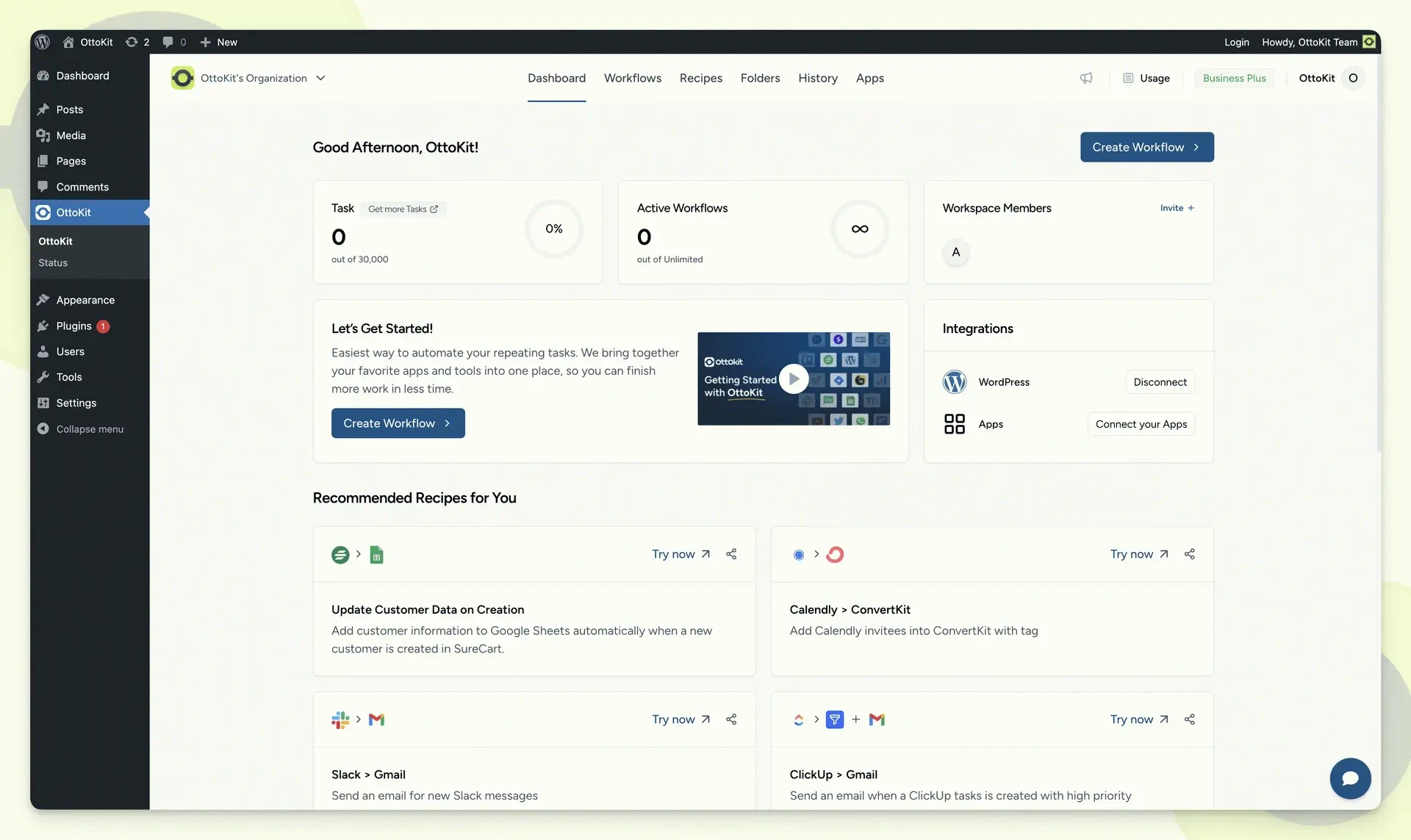
Why the OttoKit name shows up when you search SureTriggers
Here you will decide whether SureTriggers and OttoKit are the same thing in practice.
SureTriggers is widely associated with the OttoKit name now, so you will see “OttoKit vs Zapier” searches even when people mean the same comparison. Treat it as a naming layer, not a separate category.
If you want to validate the rename quickly, start with the OttoKit page that explains the platform and positioning as a Zapier alternative at OttoKit as a Zapier alternative.
Example: if you read an older tutorial that says “SureTriggers,” but the interface you see says “OttoKit,” the workflow idea can still be correct. What you should re-check is the trigger you plan to use and whether it is instant or polling.
Instant vs polling triggers: how late is too late?
Here you will decide whether timing will change your answer more than features.
A simple definition helps. Instant triggers run as soon as an event happens, usually through webhooks or direct event hooks. Polling triggers check for new data on a schedule, so the automation can be minutes late even when everything is working.
Zapier supports both patterns. Many app triggers poll, and the check interval can vary by plan. Zapier states that polling trigger intervals can range from every 1 minute to every 15 minutes depending on the plan and trigger type.
If a delay does not matter, polling is fine. If your workflow is time-sensitive, polling can be the whole decision.
Scenario example: You sell a limited seat offer. A purchase should trigger “grant access” and “send onboarding” fast. If your automation runs 10 minutes late, customers email support, refunds increase, and your team loses trust in the system.
Do, Avoid, Proof
- Do: choose a trigger type based on whether minutes of delay are acceptable.
- Avoid: assuming every trigger is instant just because the tool feels instant.
- Proof: run one real test order or form submit and time how long it takes end-to-end.
zapier tasks pricing: the simple math most people miss
Here you will decide whether usage-based costs will be predictable for your workflows.
Zapier pricing is tied to usage. The critical unit is the task. Zapier explains what counts as a task in its help center.
The practical rule: multi-step workflows multiply usage. One trigger plus three successful actions usually means three tasks, not one. Filters and paths can also change how many actions run.
SureTriggers (OttoKit) pricing is not task-based in the same way as Zapier, so your cost risk is different. Instead of “task math,” you typically worry about whether your plan fits your workflow count and connected services. You should verify current pricing on the official pages before you decide, starting with Zapier pricing and OttoKit pricing. Pricing subject to change. Verify current pricing on the official developer/vendor page.
A quick way to estimate cost risk is to count actions, then estimate how often the trigger happens.
Use the examples below as a template. Swap in your own numbers.
| SureTriggers (OttoKit) | Zapier | |
|---|---|---|
| Lead form to email + sheet | Plan fit depends on your workflow setup | Tasks scale with action count and lead volume |
| WooCommerce order to fulfillment + CRM | Plan fit depends on workflow setup | Tasks scale fast if each order triggers multiple actions |
| Membership access + onboarding | Plan fit depends on workflow setup | Tasks scale with each step you add per member event |
Scenario example: You get 20 leads per day. Your workflow has 4 actions that run on every lead. That is roughly 80 actions per day. Multiply it out monthly and you see why “small” automations can become a real line item.
Do, Avoid, Proof
- Do: write down your top 3 workflows and count actions that run on every event.
- Avoid: budgeting from a single-step mental model when you actually have multi-step logic.
- Proof: after you launch, check task usage logs weekly until the number stabilizes.
WordPress automation plugin workflows where SureTriggers can win
Here you will decide whether a WordPress-first automation layer will reduce friction for your day-to-day operations.
SureTriggers (OttoKit) tends to feel strongest when your triggers are native WordPress events, and you want those events to stay close to the site.
Common WordPress-first workflows:
- WooCommerce automations: order status changes, customer actions, product events.
- Form leads to CRM: capture the lead in WordPress, then route it to your CRM or email tool.
- Membership and LMS access: enrollments, access grants, role changes, onboarding sequences.
- User role changes: upgrade customers, revoke access, notify admins, tag users.
If you run memberships or courses, the workflow details matter more than the tool name. This is where a quick map helps, especially around access control and role changes. See the LMS workflow tradeoffs in LearnDash vs Tutor LMS vs Sensei LMS.
When Zapier wins in these same workflows:
- The “real” system is outside WordPress, like a CRM pipeline or a sales tool.
- You need many external apps connected in one place.
- Your WordPress event is just one step in a larger cross-app process.
Scenario example: A form submit on WordPress is easy either way. The difference shows up when you add “dedupe, enrich, then route to two systems.” That is where Zapier’s app-first model can feel more natural.
Monitoring and recovery: what to check when automations go silent
Here you will decide which tool gives you faster diagnosis when something fails.
Automation tools do not fail loudly. They fail quietly. You need a predictable place to look when a run breaks.
Zapier has a central log area for runs and task usage. Start with Zapier history and task usage. If you need to rerun a failed run, Zapier also explains replay behavior at replay Zap runs.
OttoKit offers workflow run history and logs, including replay features, at OttoKit history logs and replay and OttoKit workflow history.
When you troubleshoot, check these in order:
- Did the trigger fire at all.
- Did the action run with the expected fields.
- Did a connection expire or get revoked.
- Did a field mapping change upstream.
- Did your security or caching setup block webhooks or API calls.
30-second self-check
- Open the workflow run history.
- Find the last successful run.
- Compare its input fields to the last failed run.
- If the fields differ, fix mapping first before you touch timing or filters.
One security note that matters for WordPress-first setups: any plugin that sits in your WordPress stack must be kept updated. Wordfence reported a critical privilege escalation issue affecting SureTriggers under active exploitation in May 2025 at Wordfence report on a SureTriggers vulnerability. That does not mean you should avoid the tool, but it does mean you should treat updates, least privilege, and audit habits as non-negotiable.
Setup location and governance: keeping automations maintainable
Here you will decide how to prevent a working automation setup from becoming a fragile mess.
The hidden cost is not the first automation. It is the tenth. Without naming rules and ownership rules, you will not know what to trust.
Practical governance rules that work for both tools:
- Use one dedicated automation owner account, not a personal account.
- Name workflows by trigger plus outcome, like “Order completed -> create support ticket.”
- Keep a short note inside each workflow with the reason it exists and what would break if it stops.
- Review connections quarterly. Expired tokens are a top failure source.
- Keep “high-stakes” workflows simple. Use fewer steps and fewer moving parts.
Scenario example: You add two people to “help with automations.” Three months later, half your workflows run under different accounts. Someone leaves, an account gets locked, and the workflows stop. This is preventable if ownership is centralized from day one.
Migration checklist: moving from Zapier to SureTriggers or the other way
Here you will decide how to switch tools without losing leads, orders, or access changes.
Do not migrate by rebuilding everything and flipping a switch. Migrate by running parallel workflows, then cutting over once you have proof.
Migration steps that reduce risk:
- List your top 5 workflows by business impact, not by how often they run.
- For each workflow, write the trigger, the actions, and the exact fields you rely on.
- Identify timing expectations. Decide what “too late” means.
- Rebuild the workflow in the new tool with the same field mapping.
- Run both tools in parallel for a short window, but prevent double actions with a dedupe rule.
- Compare logs for the same event. Confirm the output matches.
- Cut over one workflow at a time, starting with the lowest-risk one.
- Keep the old workflow disabled, not deleted, until you are sure you do not need its history.
- Add a simple alert routine so you notice silence fast.
Do, Avoid, Proof
- Do: migrate one workflow at a time.
- Avoid: switching the highest-impact workflow first.
- Proof: after cutover, confirm the next 10 real events all reached the final destination.
Alternatives when neither fits
Here you will decide if you are forcing a two-tool choice when you actually need a different category.
If you want a WordPress-first automation layer but these two do not match your needs, consider Uncanny Automator, AutomatorWP, or WP Webhooks. The right pick depends on your exact trigger sources and how much work you want inside WordPress versus outside it.
Final verdict: SureTriggers vs Zapier
Here you will choose the tool that matches your trigger source, timing needs, and cost risk.
SureTriggers vs Zapier is not a “better tool” question. It is a “where does my business logic live” question.
Pick SureTriggers (OttoKit) when WordPress events are your main triggers and you want a WordPress-centric automation layer that matches that reality. Pick Zapier when your workflows start in external apps and you need a central cross-app hub, even if some triggers are polling triggers and you need to watch usage.
If you want the most practical hybrid: keep WordPress triggers in SureTriggers (OttoKit), then hand off to Zapier only when the workflow truly requires an external app connection.
Frequently Asked Questions
SureTriggers vs Zapier, which one is better for most WordPress sites?
Most WordPress sites get the cleanest setup when the tool matches the trigger source. If your triggers are WooCommerce, forms, memberships, and user roles, SureTriggers (OttoKit) usually maps more naturally. If your triggers start in external apps like CRMs and spreadsheets, Zapier is usually the better fit.
Is OttoKit the same as SureTriggers?
In practice, OttoKit is the name you will see tied to SureTriggers in many places now. Treat it as a naming shift, then validate the specific triggers and actions you need before you commit.
Are Zapier triggers instant or delayed?
Some are instant, especially when webhooks are supported. Many others are polling triggers that check on a schedule, which can introduce delays. Always test your exact trigger path before you rely on it.
What counts as a task in Zapier?
A task is typically counted when an action successfully runs. Multi-step automations can multiply tasks fast because each action can count separately. The safest approach is to estimate tasks by counting actions that run on every trigger.
Can SureTriggers replace Zapier for cross-app workflows?
Sometimes, but it depends on the exact apps and the depth of the integration you need. If your workflow relies on a niche CRM action or a very specific app step, validate that step before you switch.
Which tool is safer for high-stakes workflows like access control?
Safety comes from monitoring, testing, and ownership rules more than from the tool name. For access control, keep workflows simple, test timing, and monitor run history so you catch failures quickly.
What is the fastest way to decide between OttoKit vs Zapier for my setup?
Write down your top workflow in one line, then answer three questions: Where does the trigger start, how late is too late, and how many actions run per event. If triggers start in WordPress and timing matters, lean OttoKit. If triggers start outside WordPress and you need many apps, lean Zapier.
🛡️ Disclosure: TrendMeadow is reader-supported. Some links in this post are affiliate links — we may earn a small commission if you make a purchase, at no extra cost to you. Learn more ↗