
LowFruits Review: How Weak Spots and Credits Really Work
This LowFruits review is for U.S. site owners who want a faster way to find keywords that look beatable after a real SERP check, not just a difficulty score.
Quick verdict
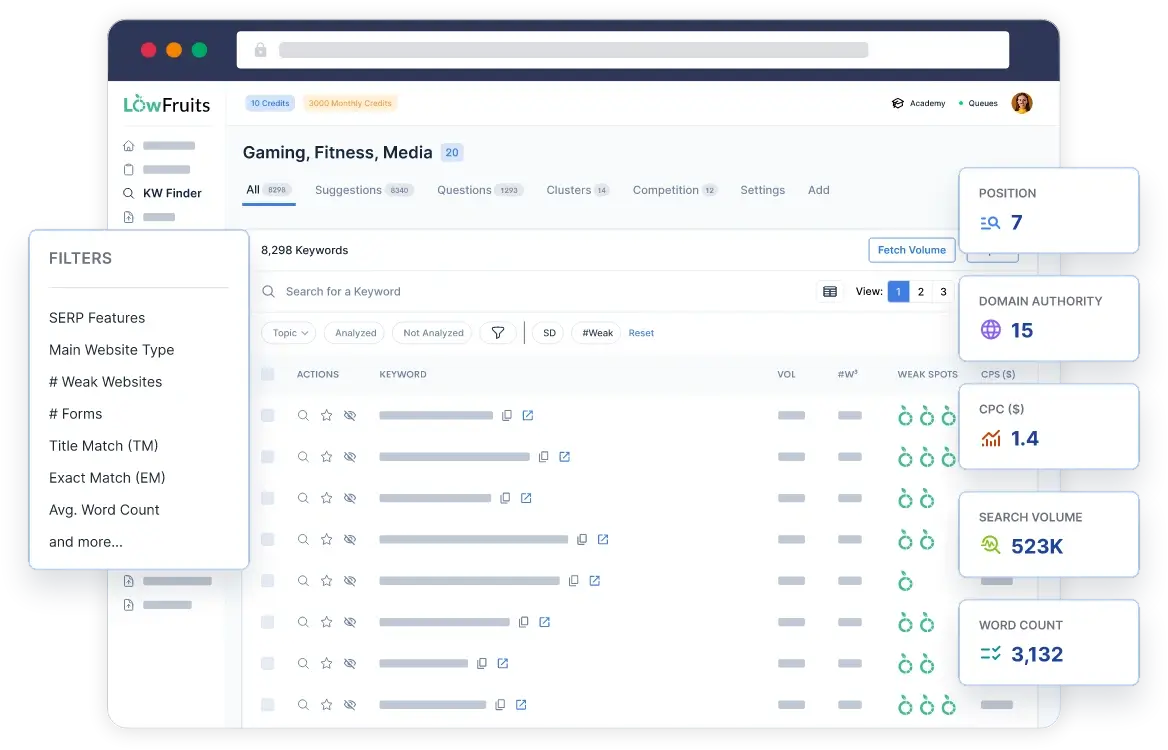
LowFruits is a good fit if your main bottleneck is SERP review. It is built around spotting “weak” results on page one and helping you filter toward keywords where that happens more often. See how the product positions this on the LowFruits homepage.
It is not a full SEO suite. If you need deep backlink research, technical audits, or broad competitive intelligence in one platform, LowFruits is a focused SERP analysis and keyword discovery tool, not an all-in-one replacement. The pricing page also makes that scope clear.
If you want the fastest path to turn keyword picks into traffic, pair this with a clean publishing system like Complete Blog SEO Strategy: The TrendMeadow Authority Framework and solid on-page execution via Rank Math SEO Plugin Review: Features, Setup, and Results (or Yoast SEO Plugin Review: Features, Setup, and SEO Impact).
What LowFruits actually does
LowFruits combines three core parts:
- A keyword finder for long-tail ideas
- A SERP analysis workflow that flags weaker results
- Keyword clustering to group related terms
LowFruits summarizes what’s included on its What’s included page.
Where it stands out is the “Weak Spots” concept. LowFruits defines a weak spot as a page that can easily be beaten in the SERPs. It also distinguishes “weak websites” using Moz Domain Authority, and it labels DA values below 20 as weak. That definition is documented in the LowFruits glossary.
That framing matters. The tool is not promising rankings. It is trying to reduce wasted time by helping you spot SERPs where some of the current top results look less entrenched.
How the keyword ideas are generated
LowFruits’ KWFinder pulls ideas from Google autocomplete suggestions. In their documentation, LowFruits says KWFinder fetches ideas from the Google Auto Suggest API plus additional proprietary Google sources, and uses over 250 modifiers around a seed keyword. See how KWFinder fetches keyword ideas.
They also describe a boosted version for subscribers that uses over 1,000 modifiers on that same page.
Practical takeaway: it’s strongest for finding long-tail variations and high-intent patterns, then narrowing down to the terms worth analyzing in the SERPs.
What “Weak Spots” means in plain English
LowFruits uses icons and labels to surface what it considers weaker competing results:
- A Weak Spot is a page that can easily be beaten in the SERPs
- A Weak Website is a low-authority site measured with Moz DA, with DA below 20 labeled weak
- A blue fruit icon represents a forum or UGC page
- A green fruit icon represents a low-authority website
Those definitions are documented in the LowFruits glossary.
This is useful when you are trying to decide “Do I have a realistic angle here?” without opening and judging ten results for every keyword.
One important limitation: Moz DA is a third-party metric. It can be directionally helpful, but it is not a ranking factor, and it will not capture everything that makes a result hard to beat. Treat Weak Spots as a prioritization signal, not a guarantee.
How credits work
LowFruits uses credits mainly when you extract SERPs for keywords.
LowFruits explains the credit model on the pricing page and in its how credits are used documentation:
- On pay-as-you-go, you get 3 free KWFinder searches every 7 days, then 1 credit per extra search
- On a subscription, keyword searches are unlimited
- 1 SERP extracted, meaning 1 keyword analyzed, equals 1 credit
- PAYG credits expire after 1 year
- Subscription credits reset monthly and do not roll over
This makes cost planning straightforward. Your main budget driver is how many keywords you want to run through SERP extraction.
Pricing and plans
PAYG is usually best when you work in bursts. Subscriptions tend to make more sense when you do steady research every month and want the subscription-only features.
Pricing subject to change. Verify current pricing on the official developer or vendor page.
The numbers below are taken from the LowFruits pricing page.
| Plan / Option | Price | Credits | Key limits and notes |
|---|---|---|---|
| PAYG pack (small) | $25 | 2,000 | Credits expire after 1 year |
| PAYG pack (mid) | $60 | 5,000 | Credits expire after 1 year |
| PAYG pack (large) | $100 | 10,000 | Credits expire after 1 year |
| PAYG pack (bulk) | $250 | 50,000 | Credits expire after 1 year |
| Standard subscription | $29.90 monthly or $20.75 monthly billed yearly | 3,000 per month | 100 tracked keywords. Credits reset monthly |
| Premium subscription | $79.90 monthly or $62.45 monthly billed yearly | 10,000 per month | 500 tracked keywords. Credits reset monthly |
What’s included
If you are comparing LowFruits to other tools, separate “core features” from “subscription-only extras,” because that is where the real value gap shows up.
Core features include KWFinder, SERP Analyzer, and keyword clustering. LowFruits lists these on its What’s included page.
For subscribers, LowFruits also lists several subscription extras on that same page, including:
- Access to the number of weak websites and SERP difficulty scores for millions of keywords already analyzed in the tool
- A Domain Explorer with access to a database of over 150,000 low-authority websites
- A keyword rank tracker
- A boosted KWFinder
- Competitor and sitemap extraction tools
All of the above are described on What’s included. If you want those subscription extras and you will use them monthly, a subscription is usually the cleaner fit. If your workflow is mostly “find ideas, do SERP checks, export,” PAYG can still work well.
A simple workflow that matches how the tool is built
Here is a clean way to use LowFruits without turning it into busywork:
- Start with a tight seed keyword and choose the target country.
- Use KWFinder to generate long-tail ideas from autocomplete. See how KWFinder fetches keyword ideas.
- Extract SERPs for the short list of keywords you might actually publish. Remember that one SERP extraction equals one credit per keyword analyzed. See how credits are used.
- Prioritize keywords where the SERP shows more Weak Spots, then open the actual results and check intent match and content quality yourself. See the LowFruits glossary.
- Cluster closely related terms so you are not writing five thin pages that should have been one strong page. See What’s included.
If you want a bigger system for turning keywords into clusters and posts, use Complete Blog SEO Strategy: The TrendMeadow Authority Framework.
Refund policy and what it practically means
LowFruits states that if you change your mind within 14 days of purchase and have used less than 100 credits, you can request a full refund. They also state refunds are not available for credits already used and not available for partial service periods. See the refund policy.
If you want the safest test, use the tool enough to validate that Weak Spots match your niche, but keep usage under that threshold until you are confident you want to keep it.
Who this is for and who should skip it
Good fit if you
- Write content targeting long-tail queries and want a faster way to shortlist SERPs that look beatable
- Prefer SERP-based judgment over a single difficulty score
- Plan content in clusters and want a built-in clustering step
Skip it if you
- Need deep backlink analysis, link gap research, or technical site audits as part of the same tool
- Only publish a few posts per year and do not want a credit system to manage
- Expect Weak Spots to act like a ranking guarantee instead of a prioritization signal
Practical WordPress tie-in
LowFruits helps you decide what to write and what to skip. It does not replace on-site SEO execution.
If you are deciding on an SEO plugin for titles, indexing controls, and schema basics, compare Rank Math SEO Plugin Review: Features, Setup, and Results and Yoast SEO Plugin Review: Features, Setup, and SEO Impact.
If structured data is a big part of your content plan, see Schema Pro vs AIOSEO: Structured Data Features, SEO Fit, and Tradeoffs.
frequently asked questions
Is LowFruits good for a brand-new site?
It can be, because the Weak Spots approach is built around spotting weaker results and low-authority competitors, with “weak” defined as Moz DA below 20. You still have to match intent and publish something better than what is ranking. See the LowFruits glossary.
What does a Weak Spot actually mean?
In LowFruits’ glossary, a Weak Spot is a page that can easily be beaten in the SERPs. It is a tool-defined label meant to help you prioritize SERPs that look less locked down. See the LowFruits glossary.
Where do the keyword ideas come from?
LowFruits says KWFinder fetches ideas from the Google Auto Suggest API plus additional proprietary Google sources, using over 250 modifiers around your seed keyword. See how KWFinder fetches keyword ideas.
What actions cost credits?
LowFruits states that a SERP extracted, meaning one keyword analyzed, uses one credit. On PAYG, extra KWFinder searches cost one credit after the free searches allowance. See how credits are used.
Do PAYG credits expire?
Yes. LowFruits states PAYG credits expire after one year. Subscription credits reset monthly and do not roll over. See the pricing page.
Should I get PAYG or a subscription?
PAYG is usually better if you run occasional research batches and mostly need SERP extraction. A subscription is more compelling if you want the subscription extras like Domain Explorer, a rank tracker, and boosted keyword discovery, and you use the tool every month. See What’s included.
What is the refund policy?
LowFruits states refunds are available within 14 days of purchase if you have used fewer than 100 credits. They also state refunds are not available for credits already used or partial service periods. See the refund policy.
🛡️ Disclosure: TrendMeadow is reader-supported. Some links in this post are affiliate links — we may earn a small commission if you make a purchase, at no extra cost to you. Learn more ↗